


Contacts
4.4104.00 Reviews
App Specs
- Version
- 17.7.17
- Updated On
- License
- Free
- Downloads
- 1,000,000+
- Developer
- Phone Dialer App
- Categories
- Communication
- Platform
- Android
Screenshots
 Analysis by AppCompare
I usually open a contacts app with one practical goal: find the right person quickly, then move on to a call or message without getting lost in old entries. Contacts is built for that familiar chore, but its appeal is less about replacing every communication tool and more about giving names, numbers, and personal details a clearer home. In my view, it makes the most sense for people whose address books have accumulated duplicates, vague labels, and useful reminders scattered across memory.
This is a free communication app from Phone Dialer App, and its focus reaches beyond storing phone numbers: its name and caller-identification emphasis suggest a place to manage contacts alongside everyday calling. It has a 4.4 average from around 6,200 ratings and more than 1 million installs, which gives a prospective user some context without guaranteeing that every feature will suit every phone. The app is rated for Everyone, was released on February 7, 2024, and its current version is 17.7.17; it requires Android 7.0 or later.
Start with the mess you already have
The best reason to try a different address book is often not that the existing one is unusable, but that it has become hard to trust. A person may appear under an old work number and a newer mobile number, or a name may be too generic to identify at a glance. The app is aimed at exactly this sort of everyday friction: keeping a useful contact list accessible and making it easier to locate someone when you need them.
Before relying on any new contact manager, I’d take a minute to inspect the phone’s existing entries and make sure the important numbers are present and current. That small check is worthwhile because the app’s convenience depends on the quality of the contacts it is working with. A cleaner interface can make a list easier to use, but it cannot make an outdated number correct by itself.
Move from a name to the right person
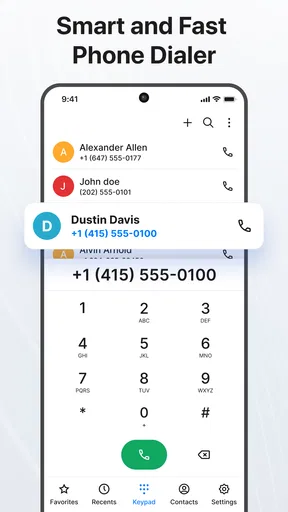
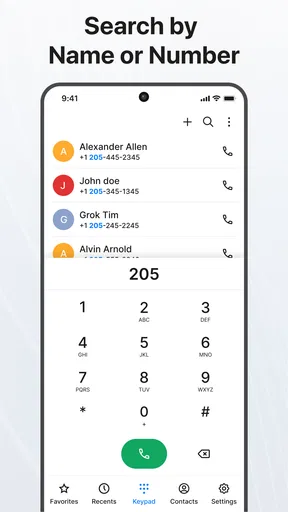
Once the list is in place, the most useful test is how quickly I can find a person whose name I only partly remember. Search by name or number is familiar, while tags offer another way to narrow down a list when a name alone is not enough. For instance, labelling a contact by where I know them from can be more practical than trying to remember whether I saved them under a full name, nickname, or company.
I would use that approach sparingly. A handful of meaningful tags can make searching more precise; a large collection of overlapping labels can turn contact management into a filing project of its own. The aim is not to classify every person perfectly, but to add just enough context to find the right person when the need comes up.
Keep useful context beside the number
Organization is more helpful when it reflects how I actually contact people. The option to sort people into groups such as family or work can make it easier to think in terms of the next task: reaching a team, finding relatives, or getting in touch with people from a shared activity. That structure is most valuable when I use it consistently, rather than creating groups once and forgetting to maintain them.
Worth Reading Before You Choose

EA SPORTS FC Mobile 26 Is a Bigger Football Game, but It Takes Time

Flipboard Shows What News Apps Must Do Beyond the Feed

Switching to Android Auto Means Rethinking Your Driving Routine

Google Calendar Makes a Crowded Week Easier to Manage

Ludo King Makes the Most of the Minutes Between Plans

Baby Panda World Brings Quick Play to Modern Phones, but Its Game Library Feels Busy
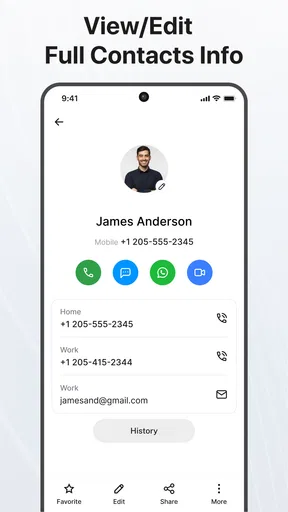
Notes and photos add a different kind of context. A brief note can preserve a detail I would otherwise forget, such as a relative’s food preference or the best time to call a colleague. A photo can help me recognize someone when a name is unfamiliar. I’d keep notes concise and appropriate for a contact record, since useful personal context is different from storing sensitive information that does not need to sit beside a phone number.
Let caller details lead to a next step
Contact management matters most when it feeds into a real conversation. Caller identification and spam-call blocking are central to the app’s positioning, so the practical promise is not just a tidier list but more confidence when deciding whether to answer an unfamiliar call. If a caller is worth keeping, having a contact manager close at hand can also make it easier to save the number with a name and enough context to recognize it later.
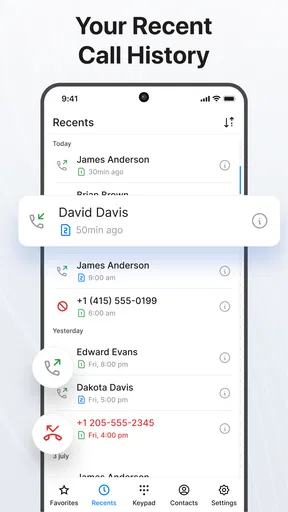
For a realistic routine, imagine getting a call during a busy afternoon from someone whose number is not saved. The useful sequence is to assess the caller, decide whether to answer, and, if the call is legitimate, preserve the identity so the next call is less of a mystery. I would still treat caller identification as a clue rather than proof: an unfamiliar number can be legitimate, and a name displayed on a screen should not replace good judgment.
The same handoff applies after a call. A number becomes more valuable once it has a clear name, a group or tag that makes sense, and a short note explaining why it matters. That little bit of follow-through can prevent the familiar problem of saving a number and then forgetting who it belongs to. It is a simple workflow, but it works only if I update the record while the conversation is still fresh.
Know when the familiar phone app is enough
Compared with the basic contacts app that comes with a phone, this app’s draw is its combination of organization and call-related tools, including caller ID and spam blocking. A built-in address book may still be the better choice if it already handles search and contact editing well, or if I want the fewest moving parts. Switching is worthwhile only when the extra organization solves a problem I actually have.
It is also not a replacement for a dedicated messaging service, email client, or social network. Group communication can be convenient from a contact list, but the conversation itself may belong in the app people already use together. Likewise, anyone who needs a carefully managed professional customer database is likely better served by a tool designed for that job rather than a personal phone address book.
Make the setup serve your habits
I would start with the contacts I reach most often instead of trying to reorganize the entire address book in one sitting. Check the names and numbers, merge or correct obvious duplicates where the app offers that option, and create only the groups or tags that will save time soon. This keeps setup manageable and makes it easier to tell whether the new arrangement is genuinely more useful.
Permissions and access are part of the decision with any app that works with calls and contacts. I’d review the requests shown on the device and allow only what is needed for the functions I intend to use. I would also test a call-related feature in a low-stakes situation before depending on it for screening important calls. That is a sensible way to learn how it behaves on my phone without assuming every device handles call tools in exactly the same way.
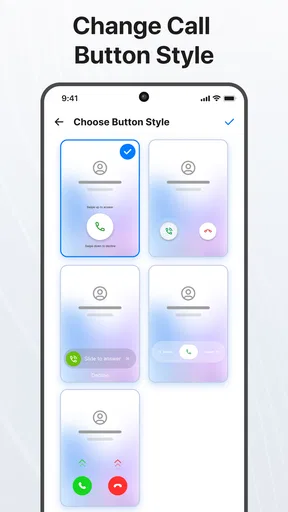
The app’s social updates, custom ringtones or vibration patterns, and direct group messaging or email can be useful extras for people who want more than a plain list. But they are not equally important to everyone. If I mainly need dependable search and a clean record of phone numbers, I would begin there and ignore optional personalization until a real need appears. If those extras are part of the reason for installing it, I’d check that they fit naturally into the way I already communicate instead of maintaining duplicate routines.
One trade-off is that more ways to organize a contact create more upkeep. Groups, tags, photos, and notes can reduce confusion, but only when I keep them current. If I rarely edit my address book, a simpler built-in option may stay more accurate simply because it asks less of me. I would treat the app as a practical organizer, not an automatic cure for years of neglected entries.
Getting Started with Contacts
First things first, downloading the Contacts app is a breeze. Available for both Android and iOS, it’s just a quick tap away in the app store. Once you’ve got it installed, you’ll be greeted with a clean, simple interface that feels like a breath of fresh air compared to the cluttered mess of some native contact apps.
Setting it up is straightforward. The app syncs seamlessly with your existing contact list, so there’s no need to manually input numbers. Hallelujah! One cool feature I noticed right off the bat is the automatic merging of duplicate contacts. If you’re anything like me and have accidentally saved a friend’s number multiple times, this feature is a lifesaver.
Organizing Your Contacts
What really sets Contacts apart is its organizational capabilities. You can easily categorize your contacts into groups. Whether it’s family, work, or that book club you joined last month, everything is neatly sorted. It’s like Marie Kondo for your phone.
The search functionality is top-notch too. You can search by name, number, or even tags you’ve assigned to your contacts. This means you can finally find “David from marketing” without scrolling through every David you’ve ever met.
Customization Galore
Customization is where this app really shines. You can add photos to contacts, making it easier to remember who’s who. Plus, you can set custom ringtones or vibration patterns for different groups. Imagine knowing who’s calling just by the buzz in your pocket. It’s the little things that make a big difference.
Another sweet feature is the ability to add notes to contacts. Need to remember that your cousin's favorite pie is pecan? Just jot it down in their contact details. These small touches make the app feel personal and incredibly useful.
Staying Connected
In today’s digital age, staying connected is more important than ever. The app offers integration with social media accounts, so you can see your contacts’ latest updates right from the app. It’s perfect for keeping up with friends who live miles away or for those moments when you can’t remember where you last saw that funny meme someone posted.
There’s also an option to send group messages or emails directly from the app. Planning a surprise party or just wanting to check in on your team? This feature makes it simple to stay in touch with multiple people at once.
Privacy and Security
Now, I know what you might be thinking: “How safe is my data?” Rest assured, the Contacts app takes privacy seriously. It offers end-to-end encryption for your contact information, ensuring your data stays secure. Plus, with regular updates and security patches, you can trust that your info is in good hands.
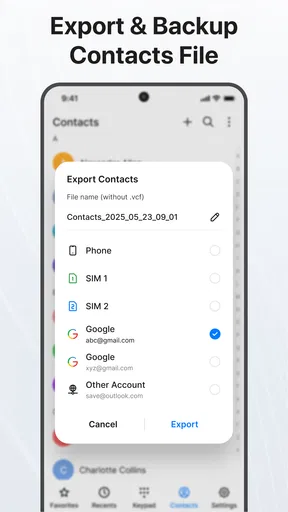
The app also allows you to back up your contacts to the cloud, providing peace of mind in case you ever lose your phone. No more panic-inducing moments when your device suddenly decides to take a swim.
Final Thoughts
At the end of the day, the Contacts app is a game-changer for anyone who wants to organize their contact list with ease. It’s user-friendly, packed with features, and prioritizes your privacy. Whether you have hundreds of contacts or just a few, this app makes managing them a breeze.
So, if you’re ready to bring order to your digital chaos, give Contacts a try. You might just find yourself wondering how you ever lived without it. Happy organizing!
Pros
- User-friendly interface
- easy navigation.
- Seamless integration with other apps.
- Customizable contact groups.
- Efficient search function.
- Secure data backup options.
Cons
- Limited customization for themes.
- Occasional sync issues reported.
- No dark mode available yet.
- Ads can be intrusive at times.
- Requires frequent updates for bugs.
FAQs for Contacts
What features does the Contacts app offer?
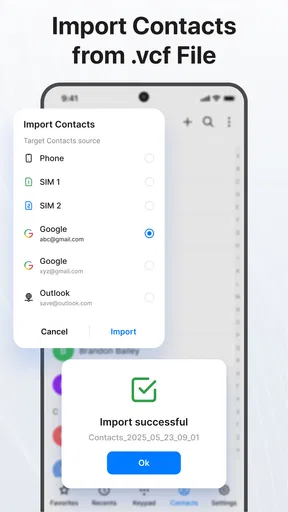
The Contacts app provides a comprehensive suite of features for managing your contacts efficiently. It includes options for grouping contacts, adding detailed information such as addresses and birthdays, and integrating with email and social media accounts. It also supports custom labels and allows easy import and export of contact lists.
Is the Contacts app secure, and how does it handle my data?
Security is a top priority for the Contacts app. It uses encryption protocols to protect your data and offers regular updates to enhance security features. The app complies with privacy regulations, ensuring that your personal information is not shared without consent. Users can also customize privacy settings to control data access.
Can I sync the Contacts app with other devices or platforms?
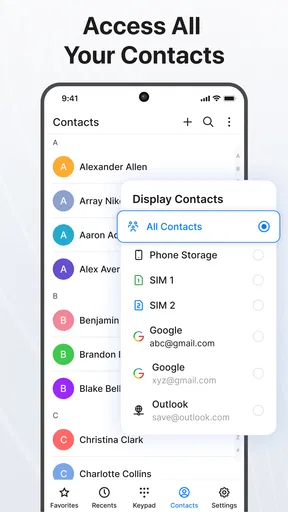
Yes, the Contacts app supports synchronization across multiple devices and platforms. It integrates seamlessly with cloud services like Google Contacts and iCloud, enabling users to access and update their contact list from any device. This ensures that your contact information is always up-to-date, no matter where you are.
Does the Contacts app offer customization options?
The Contacts app offers extensive customization options to tailor your contact management experience. You can create custom fields, use unique tags for better organization, and set personalized ring tones for different contacts. The app's interface is also customizable, allowing users to choose themes and layouts that suit their preferences.
Are there any costs associated with using the Contacts app?
The Contacts app is generally free to download and use, but it may offer optional in-app purchases or premium features. These can include advanced organization tools, ad removal, or enhanced syncing capabilities. Users can choose to upgrade based on their needs, but the core functionalities remain accessible without cost.


